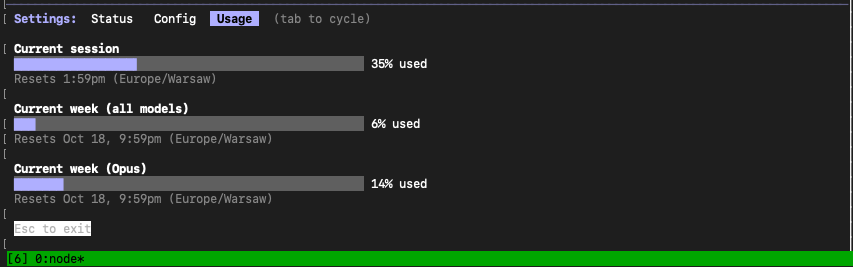
It happened. Anthropic introduced usage limits on paid Claude plans, including the flagship Opus model. If you’ve hit that “limit reached” message in the middle of an important task, you know the frustration.
But instead of getting annoyed, let’s treat this as a signal. It’s time to stop using AI like a magic toy and start treating it as a professional tool with limited, valuable resources.
Understanding the Model Hierarchy
The key insight is understanding the difference between Claude’s models:
Opus (The Architect)
- Most capable, most expensive, most limited
- Think of it as a senior developer whose time is precious
- Use for architectural decisions and complex problem-solving
Sonnet (The Executor)
- Very capable, more affordable, much higher limits
- Your reliable mid-level developer, ready for concrete tasks
- Use for actual implementation work
The New Work Strategy
The Architect (Opus) plans. The Executor (Sonnet) codes.
This division of labor maximizes both quality and efficiency.
Step 1: Use Opus to Create the Plan (One Query)
Treat Opus like a software architect. Give it one well-thought-out task to create a detailed action plan.
Example prompt for Opus:
“I’m building a REST API for a task management app. I need endpoints for users, projects, and tasks with authentication. Create a detailed implementation plan including file structure, database schema, authentication flow, and the order of implementation steps.”
Opus will give you a comprehensive blueprint. One query, maximum value.
Step 2: Use Sonnet to Execute the Plan (Many Queries)
Now the real work begins. Take the plan from Opus and feed it to Sonnet, step by step. You have a much larger limit here, so you can work freely.
Example workflow:
- “Based on this plan: [paste Opus plan]. Create the database schema for PostgreSQL.”
- “Now implement the User model with password hashing.”
- “Add the authentication middleware using JWT.”
- “Create the user registration endpoint.”
Continue through the plan, testing each piece before moving forward.
Why This Works
1. Maximize Quality
The hardest, most conceptual work (architecture) is done by the best model. Bad architecture leads to bad code - investing Opus tokens here pays dividends throughout the project.
2. Conserve Limits
The “dirty,” repetitive work (writing code according to specifications) is delegated to the model with higher limits. You’re not burning Opus tokens on boilerplate.
3. Work More Efficiently
Instead of chaotically asking questions, you have a clear structure and order to your project. The plan keeps you on track and ensures nothing is forgotten.
Practical Tips
Start your day with Opus
- If you have complex decisions to make, use Opus when your limits are fresh
- Get your architectural guidance early, then switch to Sonnet
Batch your Opus requests
- Don’t ask five separate questions; combine them into one comprehensive request
- “Review this codebase and identify: security issues, performance bottlenecks, and architectural improvements”
Keep the plan accessible
- Save the Opus-generated plan in a document
- Reference it when prompting Sonnet to maintain consistency
When limits hit, don’t panic
- You can still use Sonnet
- Plan ahead: know which tasks absolutely need Opus and save limits accordingly
The Bigger Picture
We’re no longer just “users” of AI. We’re becoming managers who assign tasks to appropriate models based on their strengths and costs.
This shift in thinking - from unlimited resource to managed resource - actually makes us better at using AI. We think more carefully about what we’re asking. We structure our work more intentionally. We get better results.
The free party may be ending, but the era of strategic AI use is just beginning.